Documents you can
rebuild
From the first letter to the archived e-invoice: how to generate documents from data with Typst, check them, store them and prove later that they are unchanged – with an AI agent, too.
Every command and output on this page is real, run with typstgen 0.4 and Typst 0.15.1 (as of 12 October 2026). Examples and diagrams are in German.
The chapters build on each other but work on their own for reference. The hands-on parts show real commands with real output.
- Chapter 01Why TypstGetting started
- Chapter 02From data to a verified archiveOverview
- Chapter 03Tools and templatesCreate
- Chapter 04Data, source, PDF – stored apartManage
- Chapter 05A seminar paper with referencesAcademic work
- Chapter 06Invoices with ZUGFeRDBusiness
- Chapter 07Keep and proveArchive
- Chapter 08Check before every pushAutomate
- Chapter 09An agent that finds its own mistakesBring in AI
Why Typst
Typst is a typesetting system: you write text with a little markup into a file, and Typst turns it into a PDF.
Compared with a word processor, everything lives in a readable text file that can be versioned, compared and compiled automatically – the same source gives the same PDF. Compared with LaTeX, the syntax is shorter, errors name file, line and column, and templates are functions in a real programming language.
Headings start with =, bold text sits between asterisks (*bold*), functions start with #: #table(…), #image(…), #bibliography(…). Formulas sit between dollar signs. Data comes into the document with json(…), csv(…) or yaml(…).
This guide uses typstgen: a small tool that compiles .typ files to PDF with an embedded Typst engine – as a command line, a Rust library, WebAssembly and an MCP server for AI agents. No typst installation is needed.
A letter in twenty lines
GoalWrite a file, compile it and see how typstgen reports an error.
- 1
Source
Set page format and font, then plain text, a heading and a table.
#set page(paper: "a4", margin: 2.5cm) #set text(lang: "de", font: "Libertinus Serif", size: 11pt) #align(right)[Musterstadt, #datetime.today().display("[day].[month].[year]")] = Angebot für die Dokumentenstrecke Sehr geehrte Frau Beispiel, vielen Dank für Ihre Anfrage. Wir schlagen vor: #table( columns: (1fr, auto), table.header([*Leistung*], [*Preis*]), [Vorlagen für Brief und Rechnung], [1.200 €], [PDF-Erzeugung in der CI], [600 €], ) - 2
Compile
typstgen writes the PDF next to the source and prints its path.
$ typstgen compile brief.typ brief.pdf - 3
A typo
table.headerbecomestable.heder. typstgen stops, names file, line and column and exits with code 1 – which scripts, CI and AI agents rely on later.$ typstgen compile brief-fehler.typ error: typst compilation failed: brief-fehler.typ:14:9: error: function `table` does not contain field `heder`
A PDF with date, heading and table. The date comes from datetime.today(); the archive chapter shows how to fix it for reproducible files.

From data to a verified archive
A document comes from data and a template. What happens next decides whether it can still be trusted in eight years.
check reports errors with file, line and column, preview shows a page as an image, compile writes the PDF – as PDF/A if needed, and for invoices with embedded ZUGFeRD XML.
A manifest records what each PDF was built from. verify rebuilds it later and compares byte for byte. The three checking steps are available to an AI agent over MCP as well.
Fokus
Quelle: typstgen 0.4 (Branch-Stand 11.10.2026)
Diagrammdaten anzeigen
| Schritt | Art | Bahn | Gruppe | Führt zu |
|---|---|---|---|---|
| Daten | Start | Erstellen | Dokument | |
| Dokument | Schritt | Erstellen | check | |
| check | Schritt | Prüfen | auch per MCP (KI-Agent) | Fehlerfrei? |
| Fehlerfrei? | Entscheidung | Prüfen | auch per MCP (KI-Agent) | Dokument (nein), preview (ja) |
| preview | Schritt | Prüfen | auch per MCP (KI-Agent) | compile |
| compile | Schritt | Ablegen | Manifest | |
| Manifest | Schritt | Ablegen | verify (später, in CI) | |
| verify | Ende | Ablegen |
Diagram labels in German.
Tools and templates
For most documents, typstgen and a template are enough. Reports generated from program code call for a library.
typstgen compiles any .typ file. It finds templates through template_paths in typstgen.toml and loads Typst packages such as @preview/… from the same folders as the Typst CLI – or not at all, if configured that way.
business-templates provides 19 business documents as a Typst package: invoice, offer, credit note, reminder, delivery note, order confirmation, letter, credentials, concept, contract, documentation, proposal, minutes, SLA, specification, task list, time sheet and handout. Accounting documents take JSON data, the others named parameters and the text as content. The layout is German (DIN 5008).
RenderReport is a Rust library for data-driven reports built from components (scores, findings, tables, charts), with Typst as the embedded engine; every PDF is PDF/UA-1.
Three documents from business-templates
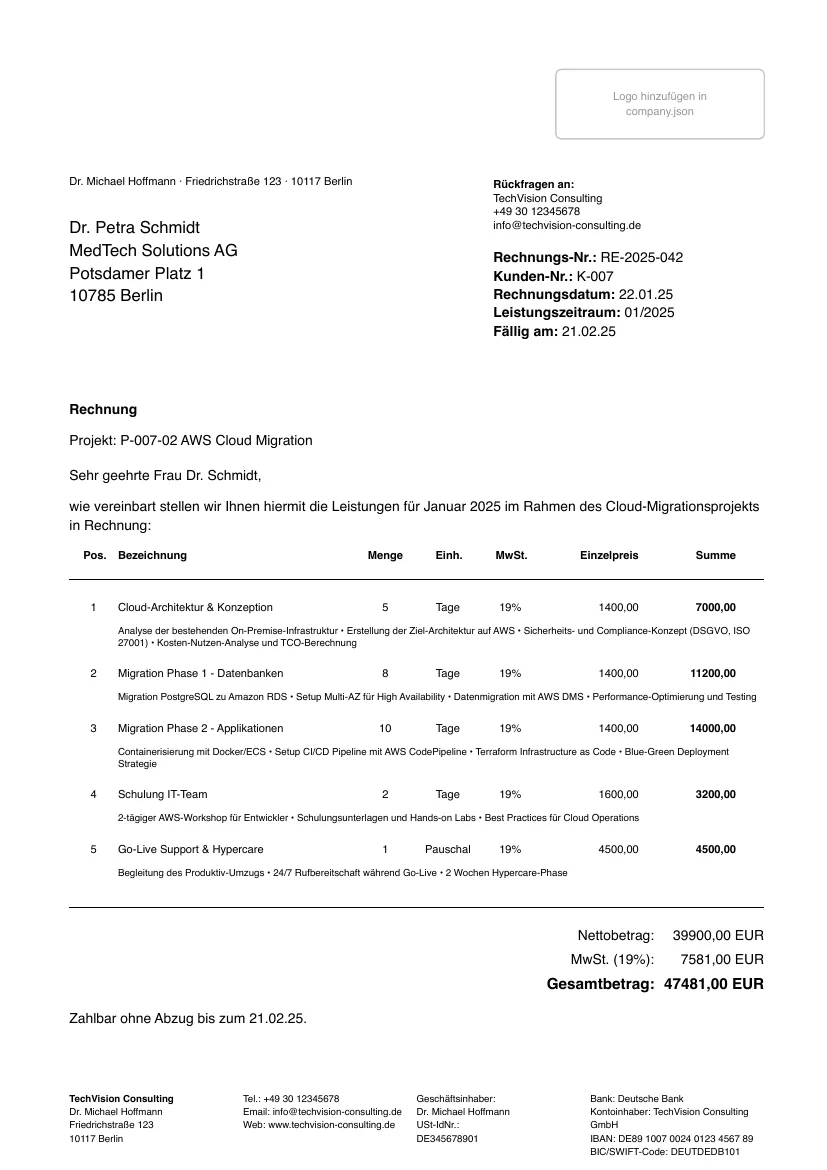
Generated with typstgen 0.4.1 from the example data in the typst-business-templates repository, 12 October 2026.
Data, source, PDF – stored apart
The data changes. The template stays. The PDF is just the result.
A folder per document type and year works well, with the document number as file name: invoices/2026/RE-2026-001.json holds the data, RE-2026-001.typ next to it is a thin wrapper that brings template and data together. Master data such as company.json lives once, centrally.
Data, wrapper and manifest are small text files and belong in version control; the history shows who changed what and when. PDFs belong in the archive storage, not in Git – the manifest ties both together.
If you keep a knowledge base for AI systems, store a compact summary of each case there and point to the source with document_id and typst_source. The system reads the entry, the customer gets the PDF; PDFs stay out of the search index.
A seminar paper with references
Title page, outlines, formulas, citations and appendix come from a package – the paper itself is just text.
The @local/thesis template lives in typstgen’s examples. It sets title page, abstract, table of contents, lists of figures and tables, roman and arabic page numbers, numbered equations, bibliography, appendix and declaration of authorship – in German or English.
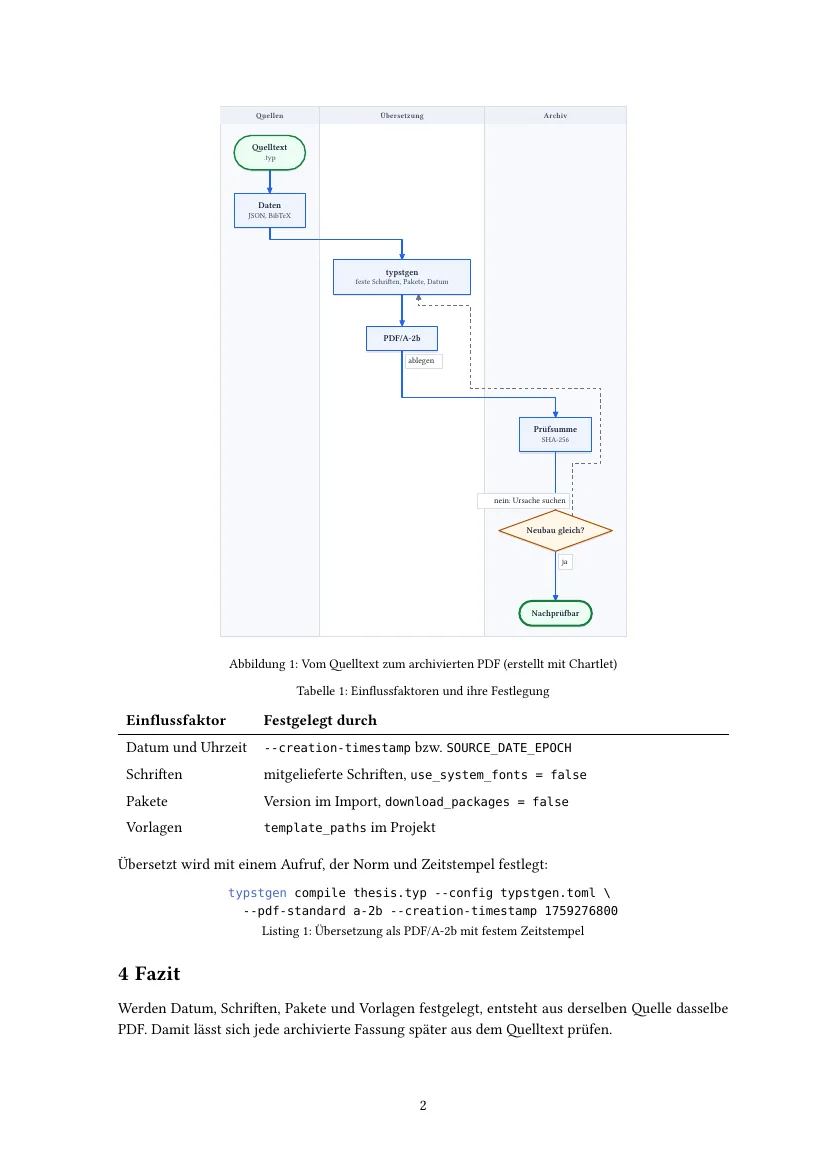
Citations use @key from a BibTeX or Hayagriva file; Typst ships the styles, such as APA, IEEE, Chicago or ISO 690. Figures such as flow diagrams come in as SVG, for example from Chartlet.
Build a paper offline and reproducibly
GoalCompile the seminar paper as PDF/A-2b without fetching anything from the network.
- 1
Configuration
The template is a package inside the project; downloads and system fonts are off.
# typstgen.toml template_paths = ["templates"] package_path = "packages" # enthält local/thesis/0.1.0 download_packages = false # nichts nachladen use_system_fonts = false - 2
Compile
Fix the standard and the timestamp – two runs give byte-identical files.
$ typstgen compile thesis.typ --config typstgen.toml \ --pdf-standard a-2b --creation-timestamp 1759276800 thesis.pdf - 3
When a package is missing
With
download_packages = falsethe build stops instead of fetching:Outputerror: typst compilation failed: paper.typ:1:9: error: package not found (searched for @preview/oxifmt:0.2.1)
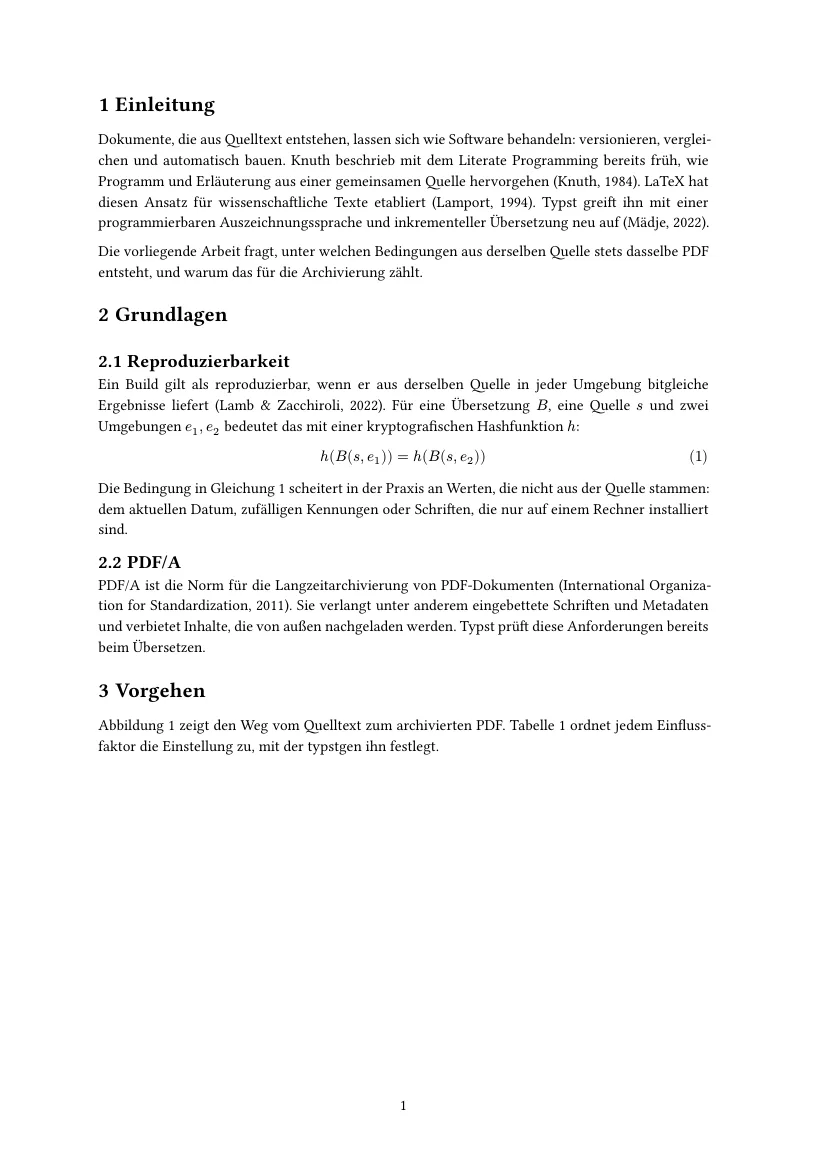
Seven pages with outlines, a Chartlet figure, a formula, a table and five real sources in APA style; veraPDF reports PDF/A-2b compliant.
Invoices with ZUGFeRD
Since 2025, businesses in Germany must be able to receive e-invoices; they must issue them from 2028 at the latest.
A ZUGFeRD invoice is a PDF/A-3 that carries the same data a second time as XML (UN/CEFACT CII, profile EN 16931). For VAT, the XML is the leading part.
typstgen builds the XML from the same JSON data the invoice template renders. It recomputes lines, VAT per category and totals first; if the JSON states different numbers, the build fails – otherwise the PDF would show something else than the XML. Covered: standard and reduced rate, 0 %, exempt with a reason, and reverse charge.
Quelle: § 27 Abs. 38 UStG; BMF-Schreiben vom 15.10.2024 und 15.10.2025 (Stand 11.10.2026)
Diagrammdaten anzeigen
| Eintrag | Art | Beginn | Ende | Nach |
|---|---|---|---|---|
| Empfang Pflicht | Meilenstein | 01.01.2025 | ||
| Papier und andere Formate erlaubt | Phase | 01.01.2025 | 31.12.2026 | |
| nur bis 800.000 € Vorjahresumsatz | Phase | 01.01.2027 | 31.12.2027 | Papier und andere Formate erlaubt |
| EDI-Verfahren zulässig | Phase | 01.01.2025 | 31.12.2027 | |
| E-Rechnung allgemein Pflicht | Meilenstein | 01.01.2028 | nur bis 800.000 € Vorjahresumsatz, EDI-Verfahren zulässig |
Diagram labels in German.
Create and check a ZUGFeRD invoice
GoalTurn rechnung.json and company.json into a PDF/A-3 with embedded XML and check it with the Mustang validator.
- 1
Document
Two lines: load the template, pass the data. The package lives in the typst-business-templates repository under
packages/local/business-templates/0.1.0;package_pathintypstgen.tomlpoints to it.#import "@local/business-templates:0.1.0": invoice #invoice(data: json("/rechnung.json"), company: json("/company.json")) - 2
Compile
--zugferdand--companybuild the XML from the same data and embed it asfactur-x.xml.$ typstgen compile rechnung.typ --pdf-standard a-3b \ --creation-timestamp 1737500000 \ --zugferd rechnung.json --company company.json rechnung.pdf - 3
Check
Mustang checks the PDF/A-3 and the XML against EN 16931.
$ java -jar Mustang-CLI-2.26.0.jar --action validate --source rechnung.pdf … Parsed PDF:valid XML:valid … Profile:urn:cen.eu:en16931:2017 Version:2 … Errors:[] - 4
When the data is wrong
Every problem at once, each with the field that fixes it:
Outputerror: ZUGFeRD invoice: recipient.address.country: unknown country, set recipient.address.country_code (ISO 3166-1, e.g. "DE") items[0]: unit "Kisten" has no UN/ECE code, set items[0].unit_code (e.g. "C62") items[1]: total 1.00 does not match quantity × unit price = 11200.00
A valid ZUGFeRD PDF in the EN 16931 profile; veraPDF reports PDF/A-3b compliant. Mixed VAT rates, reverse charge and an exempt invoice were checked as well.
Keep and prove
PDF/A keeps a file readable. That it is unchanged has to be shown separately.
typstgen compile --manifest archive.json records for each PDF which source, which options and which files it was built from – with SHA-256 of the PDF, templates, data, images, package files and fonts.
typstgen verify later checks three things: the stored PDF is unchanged, a rebuild reads the same files, and it produces the same bytes. That needs a fixed timestamp and pinned fonts and packages for every document.
Quelle: § 147 Abs. 3 AO, § 257 Abs. 4 HGB, § 14b UStG (Stand 11.10.2026)
Diagrammdaten anzeigen
| Kategorie | Wert |
|---|---|
| Bücher, Jahresabschlüsse | 10 |
| Rechnungen, Buchungsbelege | 8 |
| Handels- und Geschäftsbriefe | 6 |
Diagram labels in German: books and annual accounts 10, invoices and vouchers 8, business letters 6 years.
Record a build and verify it
GoalCreate a PDF with a manifest, verify it, change the source and see what verify reports.
- 1
Record and verify
$ typstgen compile brief.typ --pdf-standard a-2b \ --creation-timestamp 1790000000 --manifest archive.json brief.pdf $ typstgen verify ok brief.pdf 1 of 1 documents verified - 2
The source changes
A price in
brief.typchanges without recording again.verifynames the file and exits with code 1.$ typstgen verify FAILED brief.pdf changed: brief.typ the rebuild differs from the recorded PDF 0 of 1 documents verified
Any change to source, data, template, package or font shows up – and so does a changed PDF. Once the change is undone, verify reports "1 of 1 documents verified" again.
Check before every push
Locally the check is binding; in CI it is the proof at release time.
typstgen verify runs before every push – as a script or a pre-push hook. CI has no PDFs, since they live in the archive; there, verify --rebuild-only checks only that every source yields the recorded bytes.
For a rebuild on another machine to match, fonts and packages belong in the repository: use_system_fonts = false, font_paths = ["fonts"], package_path with download_packages = false. A template that asks for a system font such as Helvetica looks different on Linux otherwise.
verify as a release check
on:
  push:
    tags: ["v*"]
  workflow_dispatch:

jobs:
  verify:
    runs-on: ubuntu-latest
    timeout-minutes: 20
    steps:
      - uses: actions/checkout@v4
      - run: cargo install typstgen --version 0.4.1 --locked
- run: typstgen verify archive.json --rebuild-onlyAn agent that finds its own mistakes
An AI agent writes Typst quickly – and makes mistakes. Over MCP it can find and fix them itself.
typstgen mcp is a Model Context Protocol server on stdin/stdout with four tools: check (errors with line and column, writes nothing), preview (a page as an image), compile (PDF, optionally PDF/A or ZUGFeRD) and list_templates. All paths are confined to the workspace.
A division of labour works well: the agent writes data (JSON) and text, the template takes care of the layout, and a person reviews the result before it goes out. For e-invoices the data comes from bookkeeping, not from the language model.
An MCP session: check, fix, compile
GoalConnect typstgen to Claude Code and follow an agent repairing a broken offer.
- 1
Set up
For the current project; other MCP clients start the same command.
$ claude mcp add typstgen -- typstgen mcp --root . - 2
Find the error
The agent calls
checkand gets the error as the tool result.Outputcheck angebot.typ → typst compilation failed: angebot.typ:14:9: error: function `table` does not contain field `heder` - 3
Fix and compile
After fixing line 14: check again, look at page 1, compile as PDF/A-2b.
Outputcheck angebot.typ → ok, 1 page preview angebot.typ → image/png (Seite 1) compile angebot.typ, pdf_standards ["a-2b"] → wrote angebot.pdf (21090 bytes), 1 page
The session ran over the real protocol (JSON-RPC over stdio); the output above is the tool results, trimmed to the essentials.
Frequent questions
Does Typst have to be installed?
No. typstgen includes Typst as a library. For your own experiments, the editor on typst.app is still worth it.
Is PDF/A required?
Not by German law (as of 11 October 2026). PDF/A is the container of ZUGFeRD and common for long-term archiving.
Can I move my LaTeX paper over?
BibTeX files carry over directly. The text is moved by hand or with converters; formulas are shorter in Typst but written differently.
Why do PDFs not belong in Git?
They are results. Data, sources and the manifest belong in Git; the PDF can be rebuilt from them at any time, and verify shows it is the same.
What happens with a Typst update?
A new Typst version may typeset differently. verify then names both versions; archived PDFs stay valid, and a rebuild should use the recorded version.